For scripted audio in Pro Tools
Your first assembly in minutes, not weeks.
Give Spotline the Final Draft script, every recorded take and the script notes. It catalogues every file, picks a take for every line, led by the circle takes and the director's notes, and builds the scene in Pro Tools with a track per character, markers, fades and line numbers.
The weeks before the first real edit
On a scripted show, a lot of hours go into getting audio ready to edit. None of them go into choosing performances.
- First, cataloguing
Open every recording session, export every file, rename it to the show's convention and sort it by character.
- About a week
Pull every take for every character into a session, in order, each marked with its take.
- Another week
Assemble line by line against the script. Listen to all nine takes of a line, then dig through a day's PDF of notes to find the one the director liked.
Spotline does the cataloguing and the first assembly, the same way for one scene or a whole season, so your time goes to the edit.
The script, the notes and the take, in one file
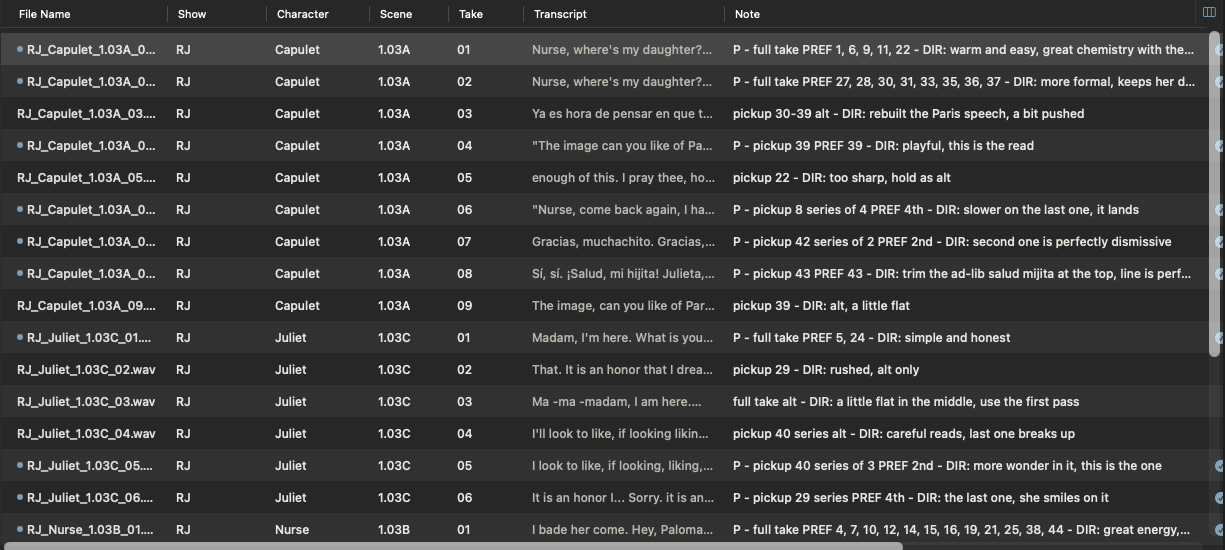
The script lives in Final Draft. The notes live in a spreadsheet. The takes sit in folders, and nobody wrote down what was actually said. Spotline transcribes every take, matches it to its script line and its note, and writes all of it into the audio file's own metadata. Now one search covers everything.
-
Script Final Draft
1 · CAPULET
Nurse, where's my daughter? Call her forth to me. -
Script notes spreadsheet
1.03A · T1 · P
DIR: warm and easy, great chemistry with the Nurse -
Recording WAV
RJ_Capulet_1.03A_01.wav
-
Transcript made on your Mac
"Nurse, where's my daughter? Call her forth to me. Thank you. This is the matter…"
- Character
- Capulet · Scene 1.3 · Take 1
- Script line
- 1 ·
Nurse, where's my daughter? Call her forth to me.
- Note
- DIR: warm and easy, great chemistry with the Nurse
- Transcript
Nurse, where's my daughter? Call her forth to me. Thank you. This is the matter. Nurse, give us leave a while…
chemistry1 take · Capulet, scene 1.3, take 1 · found in the note
One take from the example project. Character, scene and take come from the file name; each colour shows where a field came from. The fields stay in the file wherever it goes.
What Spotline does
-
Transcribes every take, so you can search the words
Every take is transcribed on your Mac. Search any word and hear it straight away.
-
Matches and imports the metadata
Set your naming convention once and Spotline fills in show, character, scene and take. Import the script supervisor's notes sheet and each row lands on its take. Need the folders by episode and scene instead of by character? Spotline copies them into the new layout from the fields.
-
Finds the take in thousands of files
Filter by character, scene, line, circle take or note, and go from a season of recordings to the one take you need.
-
Writes the script into the audio file
The script line, the notes and the transcript are embedded in each file's metadata, so they travel with the audio.
-
Assembles from all of it
Spotline picks a take for every line and builds the scene in Pro Tools. You can review and swap any pick before it goes.
Spotline puts it all together
For every line, Spotline knows where it falls in the script, which take the director chose, and exactly where in that take it was spoken. It picks the way you would: circle takes first, then the takes the notes ask for, then the read closest to the script. Then it lays every line out in order.
-
1CapuletNurse, where's my daughter? Call her forth to me.Take 1Circled. Note: "warm and easy"RJ_Capulet_1.03A_01.wavStarts 0.2 s in, 5.5 s long, in a full take of the scene
-
5JulietMadam, I am here. What is your will?Take 1Circled. Note: "simple and honest"RJ_Juliet_1.03C_01.wavEarly in a full take of her lines
-
8CapuletNurse, come back again. I have remembered me, thou's hear our counsel.Take 6Note: "slower on the last one, it lands"RJ_Capulet_1.03A_06.wavThe 4th of 4 reads in one take, as the note asked
Scene 1.3
Capulet
1 · T168 · T6
Nurse
2347
Juliet
5 · T1
Lines, takes and notes from Spotline's example project. The line 1 timing is real; the other positions are drawn to show the idea.
Check the cut before it reaches Pro Tools
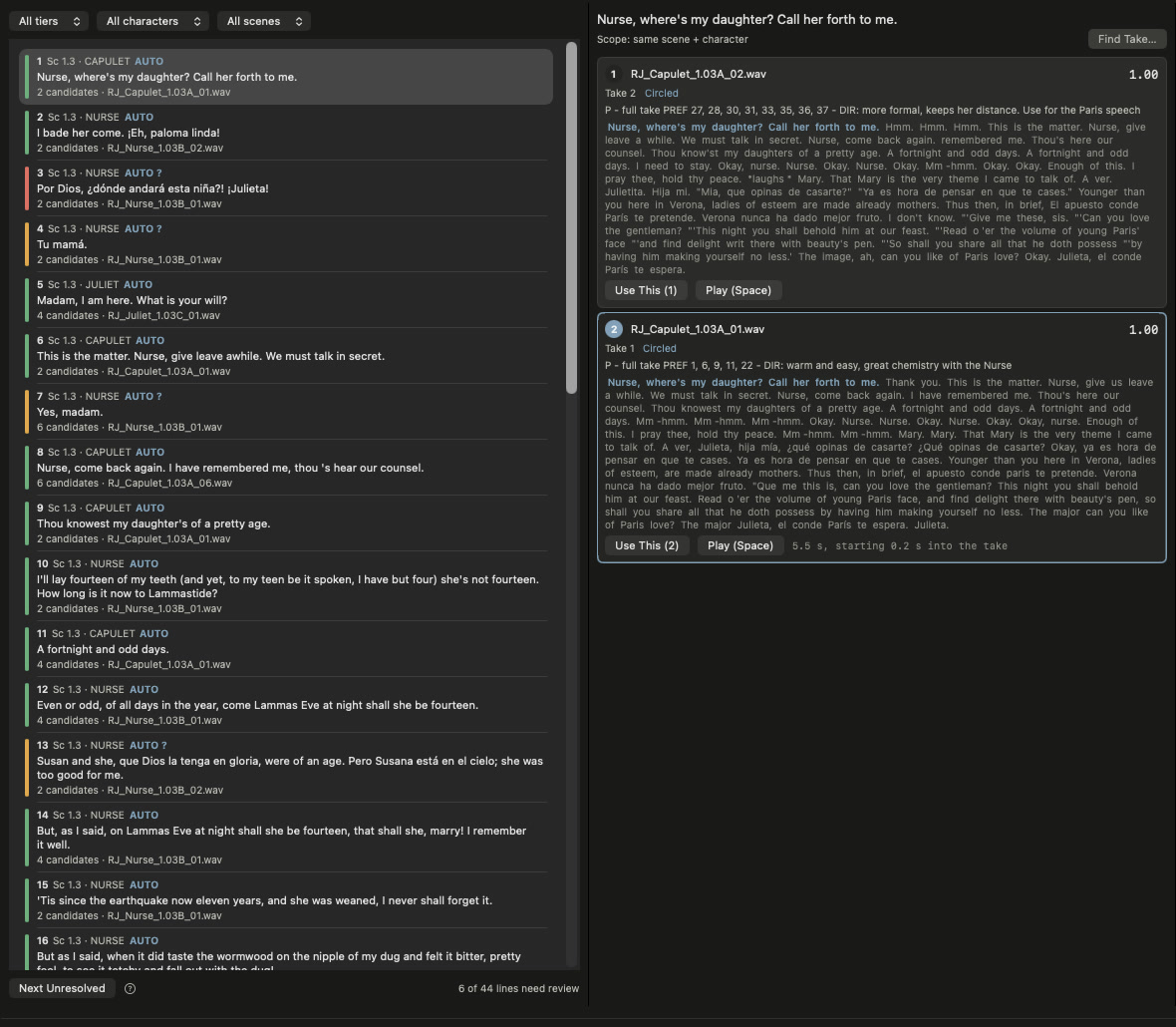
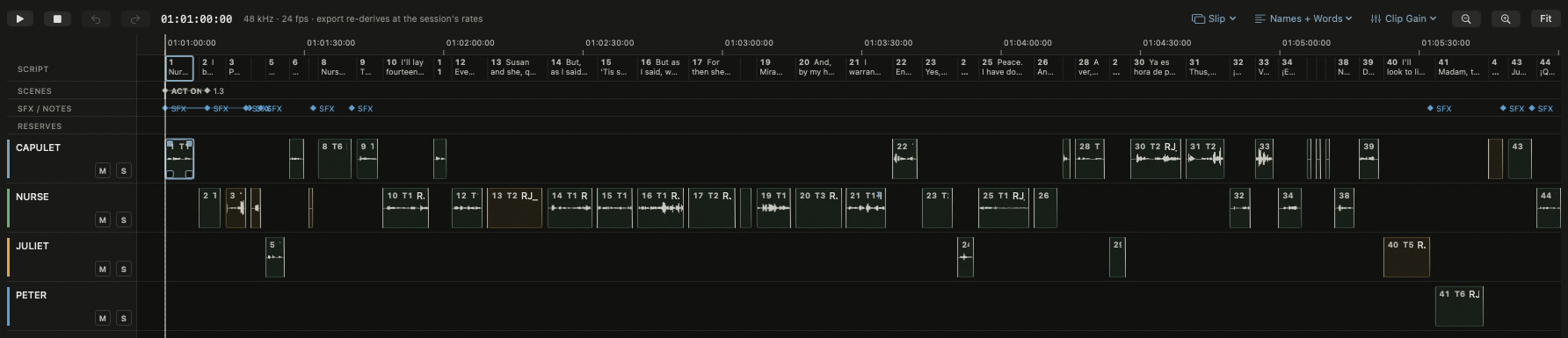
Nothing goes to Pro Tools until you say so. Step through the lines Spotline wasn't sure about and read what each take says. Then play the whole scene, trim, shape fades and swap takes on a timeline with the script running above it.
The details that save the day
Every read of a line, not just the take
When an actor reads a line four times in one take, each read is its own option, and the one the notes asked for is already picked.
A pickup list, written for you
Every line with no usable take goes on a list with its place in the cut and its length, ready to send for a pickup session.
The notes sheet, matched for you
Import the script supervisor's spreadsheet. Spotline matches each row to its file by scene, slate and take, and shows you the doubtful ones before anything is written.
Your recordings stay safe
Spotline never changes the audio itself. Each metadata write keeps a dated backup, and you can undo it from History.
Don't make the director wait while you hunt for line 39
No scrubbing through hours of takes. Every take is transcribed and every line is numbered from the script, so you search for line 39, audition the takes and press S. It lands at your cursor in Pro Tools.
Capulet
- In
- 0:02.825
- Out
- 0:03.566
- Length
- 35,568 samples
Try it: click a word to select it, or Shift-click to select a phrase. The waveform selection follows to the sample. Words and times are from take 9 in the example project.
Your client's audio stays on your Mac
Transcription and AI run locally and offline by default. Nothing is uploaded to tag, search or assemble your files.
Want an online AI provider? Add your own key, and you decide whether transcripts are sent to it.
Built for editors of scripted audio
Audio drama, scripted podcasts, episodic voice-over and radio drama, cut in Pro Tools.
If your week starts with renaming files and hunting through notes for the circled take, Spotline is built to take that week off your plate.
Spotline is coming soon
Join the waitlist and we'll email you when the beta opens.
Join the waitlist